
Every section.
A clearer understanding.
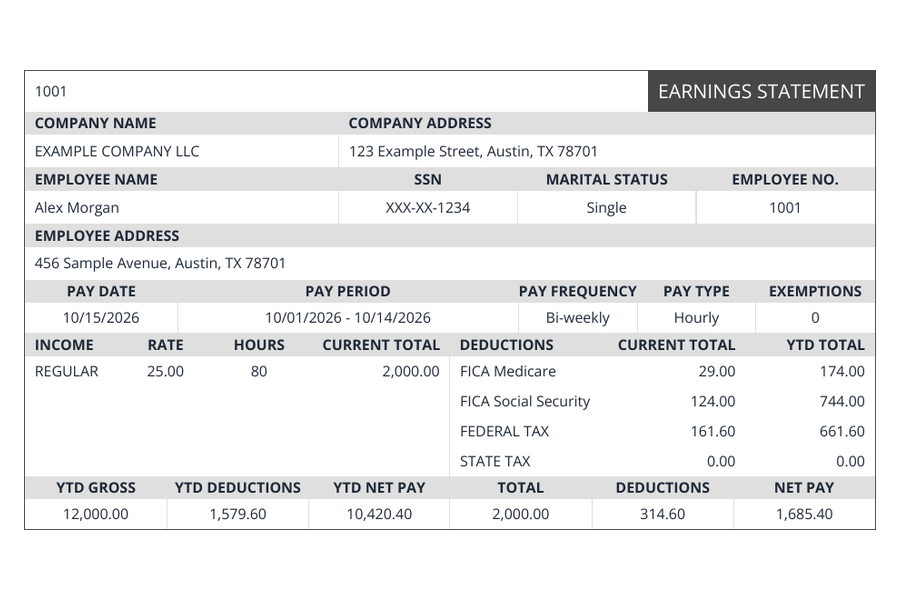
Follow the document from the details at the top to the totals at the bottom.
Employer and employee details
These identify the business and the person associated with the payroll record. Check the spelling, address, and employee number. Only enter the last four digits where the tool asks for an SSN identifier.
Pay date and pay period
The pay date is when the payment is made. The pay period identifies the dates the earnings cover. They can be different, so compare both with your records.
Gross earnings
Gross earnings are the pay before deductions. Depending on the payroll record, this can include regular wages and additional earnings. Match hours, rates, and other entries to the records for that period.
Deductions
Deductions reduce gross pay. The exact items and amounts depend on the payroll arrangement and the employee’s circumstances. Review the figures from your records rather than assuming a generated estimate is your final payroll amount.
Net pay
Net pay is the amount remaining after the deductions shown for the pay period. Make sure the earnings, deductions, and resulting total agree with the underlying payroll records.
Year-to-date totals
Year-to-date figures accumulate amounts within the relevant year. Enter the appropriate prior totals when needed; one pay period alone may not describe the year so far.
Review before you download
Check the document line by line. This service creates a document from your inputs. It does not independently confirm employment, file payroll taxes, or guarantee that another organization will accept the document.